Joining Dataframes using Merge

404 image

Introducing the Data

candy = pd.read_csv('data/candybars.csv', nrows=5, usecols=['name', 'weight', 'chocolate', 'peanuts'])
candy.head()
name weight chocolate peanuts
0 Coffee Crisp 50 1 0
1 Butterfinger 184 1 1
2 Skor 39 1 0
3 Smarties 45 1 0
4 Twix 58 1 0
candy
name weight chocolate peanuts
0 Coffee Crisp 50 1 0
1 Butterfinger 184 1 1
2 Skor 39 1 0
3 Smarties 45 1 0
4 Twix 58 1 0


Let’s load in the next dataset:

candy2m = pd.read_csv('data/candybars_merge.csv').loc[:4]
candy2m
id_number calories fat sugar chocolate_bar
0 45623 798 30.0 72.0 Butterfinger
1 87685 250 12.0 25.0 Twix
2 34534 262 8.0 40.0 3 Musketeers
3 47886 239 12.0 22.0 KitKat
4 77785 275 13.0 32.0 Babe Ruth
candy.merge(...)


candy.merge(candy2m, ...)

Key Columns

.merge() needs arguments that identify a common key column. This is a column present in both dataframes which contain common values.

To choose our key columns in each dataframe, we use the following arguments:

  • left_on - The left dataframe identifying key column label.
  • right_on - The right dataframe identifying key column label.
candy
name weight chocolate peanuts
0 Coffee Crisp 50 1 0
1 Butterfinger 184 1 1
2 Skor 39 1 0
3 Smarties 45 1 0
4 Twix 58 1 0


candy2m
id_number calories fat sugar chocolate_bar
0 45623 798 30.0 72.0 Butterfinger
1 87685 250 12.0 25.0 Twix
2 34534 262 8.0 40.0 3 Musketeers
3 47886 239 12.0 22.0 KitKat
4 77785 275 13.0 32.0 Babe Ruth
candy.merge(candy2m, left_on='name', right_on='chocolate_bar')
name weight chocolate peanuts ... calories fat sugar chocolate_bar
0 Butterfinger 184 1 1 ... 798 30.0 72.0 Butterfinger
1 Twix 58 1 0 ... 250 12.0 25.0 Twix

2 rows × 9 columns

how

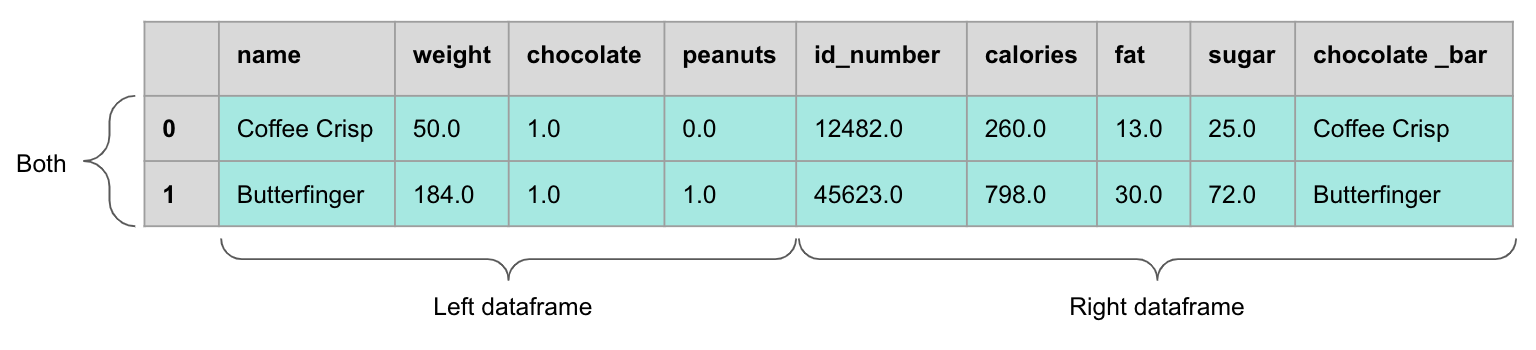
candy.merge(candy2m, left_on='name', right_on='chocolate_bar', how='inner')
name weight chocolate peanuts ... calories fat sugar chocolate_bar
0 Butterfinger 184 1 1 ... 798 30.0 72.0 Butterfinger
1 Twix 58 1 0 ... 250 12.0 25.0 Twix

2 rows × 9 columns

404 image

But there are 4 types of joins we could choose from for the how argument:

  • inner
  • outer
  • left
  • right
  • outer
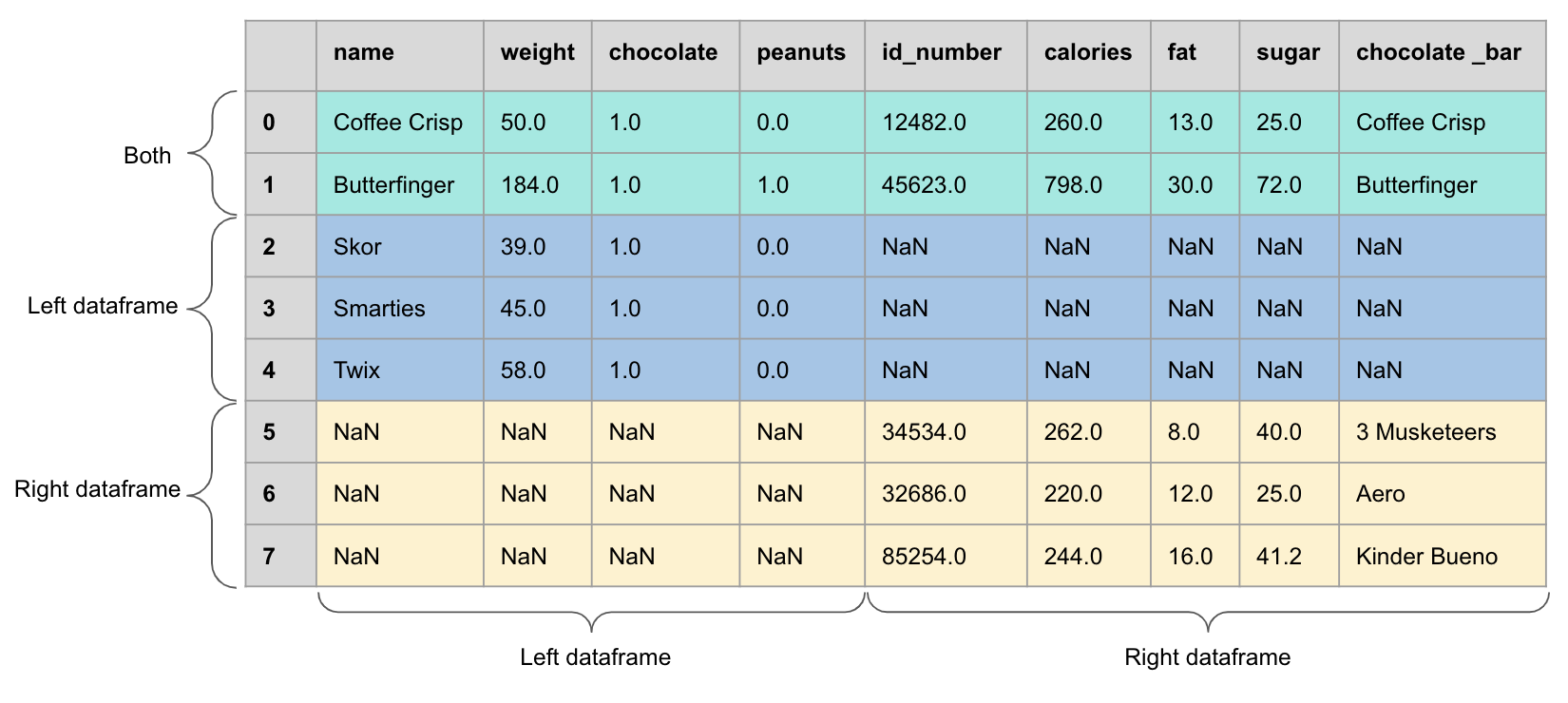
candy.merge(candy2m, left_on='name', right_on='chocolate_bar', how='outer')
name weight chocolate peanuts ... calories fat sugar chocolate_bar
0 NaN NaN NaN NaN ... 262.0 8.0 40.0 3 Musketeers
1 NaN NaN NaN NaN ... 275.0 13.0 32.0 Babe Ruth
2 Butterfinger 184.0 1.0 1.0 ... 798.0 30.0 72.0 Butterfinger
... ... ... ... ... ... ... ... ... ...
5 Skor 39.0 1.0 0.0 ... NaN NaN NaN NaN
6 Smarties 45.0 1.0 0.0 ... NaN NaN NaN NaN
7 Twix 58.0 1.0 0.0 ... 250.0 12.0 25.0 Twix

8 rows × 9 columns


404 image
  • left
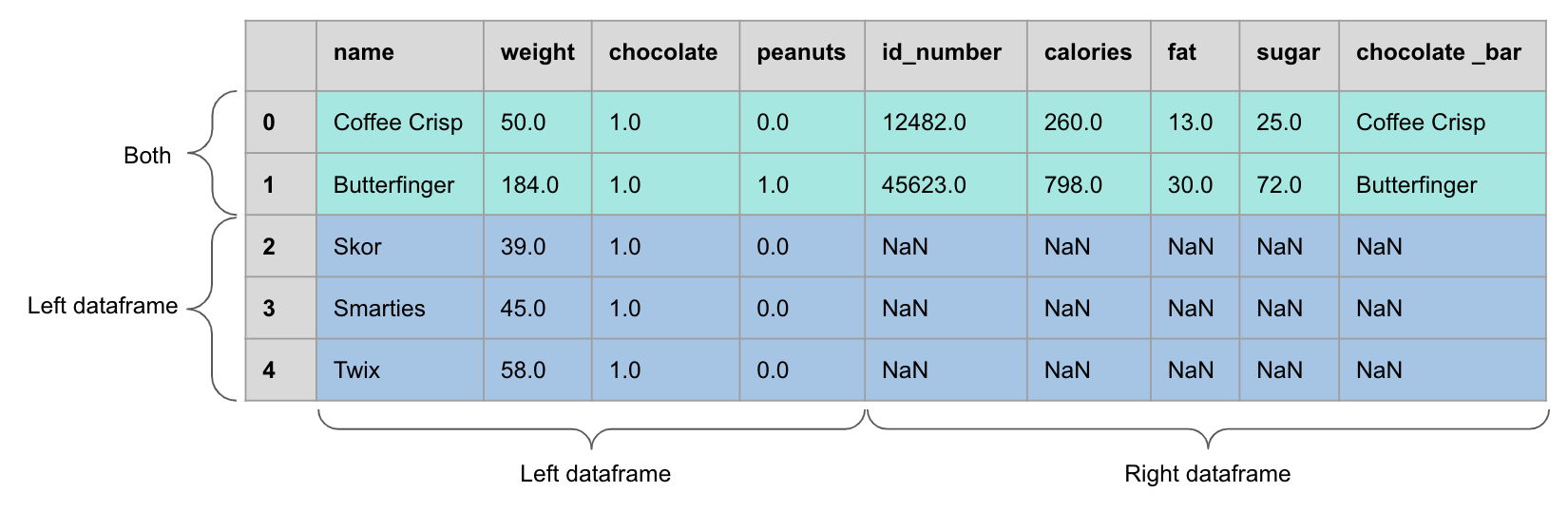
candy.merge(candy2m, left_on='name', right_on='chocolate_bar', how='left')
name weight chocolate peanuts ... calories fat sugar chocolate_bar
0 Coffee Crisp 50 1 0 ... NaN NaN NaN NaN
1 Butterfinger 184 1 1 ... 798.0 30.0 72.0 Butterfinger
2 Skor 39 1 0 ... NaN NaN NaN NaN
3 Smarties 45 1 0 ... NaN NaN NaN NaN
4 Twix 58 1 0 ... 250.0 12.0 25.0 Twix

5 rows × 9 columns

404 image
  • right
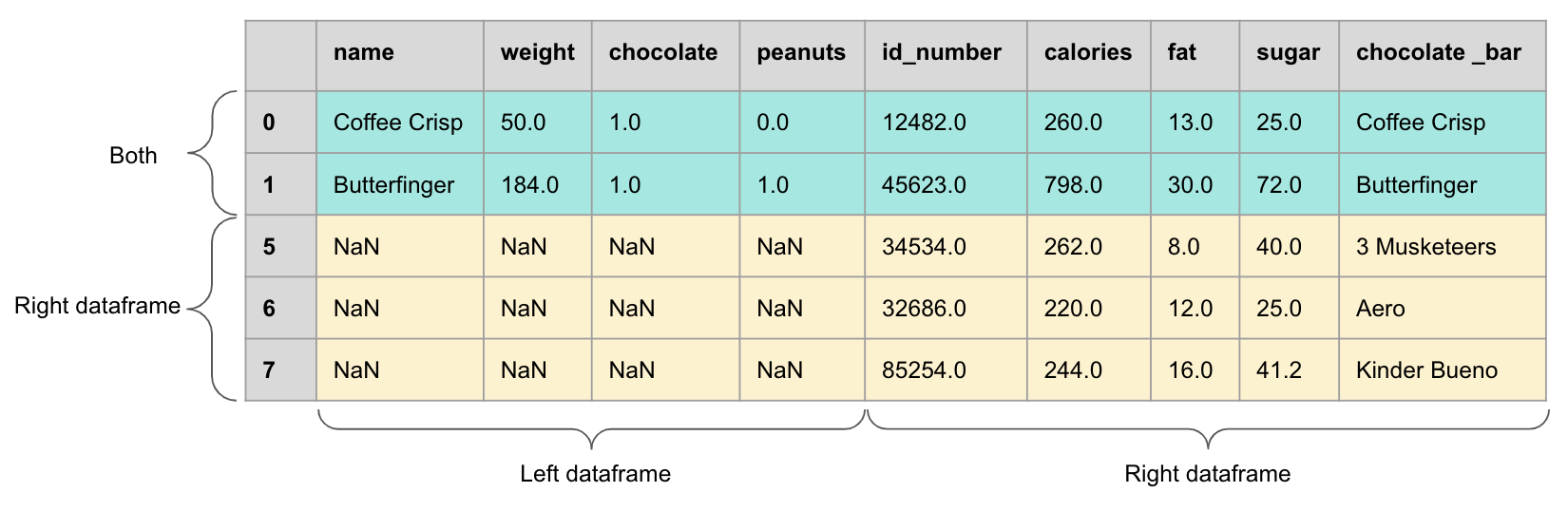
candy.merge(candy2m, left_on='name', right_on='chocolate_bar', how='right')
name weight chocolate peanuts ... calories fat sugar chocolate_bar
0 Butterfinger 184.0 1.0 1.0 ... 798 30.0 72.0 Butterfinger
1 Twix 58.0 1.0 0.0 ... 250 12.0 25.0 Twix
2 NaN NaN NaN NaN ... 262 8.0 40.0 3 Musketeers
3 NaN NaN NaN NaN ... 239 12.0 22.0 KitKat
4 NaN NaN NaN NaN ... 275 13.0 32.0 Babe Ruth

5 rows × 9 columns

404 image

indicator

candy.merge(candy2m, left_on='name', right_on='chocolate_bar', how='outer', indicator=True)
name weight chocolate peanuts ... fat sugar chocolate_bar _merge
0 NaN NaN NaN NaN ... 8.0 40.0 3 Musketeers right_only
1 NaN NaN NaN NaN ... 13.0 32.0 Babe Ruth right_only
2 Butterfinger 184.0 1.0 1.0 ... 30.0 72.0 Butterfinger both
... ... ... ... ... ... ... ... ... ...
5 Skor 39.0 1.0 0.0 ... NaN NaN NaN left_only
6 Smarties 45.0 1.0 0.0 ... NaN NaN NaN left_only
7 Twix 58.0 1.0 0.0 ... 12.0 25.0 Twix both

8 rows × 10 columns

Let’s apply what we learned!