cycling.head()
cycling.dtypes
Date         object
Name         object
Type         object
Time          int64
Distance    float64
Comments     object
dtype: object
cycling.sort_values('Date').head(15)
15 rows × 6 columns
dates = (cycling['Date'].str.split(' ', expand=True)
                           .rename(columns = {0:'Date',
                                              1:'Time'}))
dates.head()
dates = (dates['Date'].str.split('-', expand=True).rename(columns = {0:'Month',
                                                                     1:'Day',
                                                                     2:'Year'}))
dates.head()
dates.iloc[0,1]
'10'
type(dates.iloc[0,1])
str
cycling_dates = (cycling.assign(Year = dates['Year'].astype(int),
                                Month =  dates['Month'],
                                Day = dates['Day'].astype(int))
                                )
cycling_dates.head(3)
3 rows × 9 columns
cycling_dates = cycling_dates.loc[:, ['Year', 'Month', 'Day', 'Name',
                                      'Type', 'Time', 'Distance', 'Comments']]
cycling_dates.head(3)
cycling_dates.sort_values(['Year', 'Month', 'Day'])
33 rows × 8 columns
cycling = pd.read_csv('data/cycling_data.csv')
cycling.head(3)
cycling_dates = pd.read_csv('data/cycling_data.csv', parse_dates = ['Date'])
cycling_dates.head()
cycling_dates.dtypes
Date        datetime64[ns]
Name                object
Type                object
Time                 int64
Distance           float64
Comments            object
dtype: object
cycling_dates.sort_values('Date')
33 rows × 6 columns
pd.read_csv('data/cycling_data_split_time.csv').head()
5 rows × 9 columns
(pd.read_csv('data/cycling_data_split_time.csv',
              parse_dates={'Date': ['Year', 'Month', 'Day', 'Clock']})
              .head())
cycling = pd.read_csv('data/cycling_data.csv')
cycling.head()
new_cycling = cycling.assign(Date = pd.to_datetime(cycling['Date']))
new_cycling.head()
new_cycling.dtypes
Pandas datetime tools
.dt.day_name()
new_cycling['Date'].dt.day_name().head(3)
0      Tuesday
1    Wednesday
2    Wednesday
Name: Date, dtype: object
new_cycling.assign(weekday = new_cycling['Date'].dt.day_name()).head(3)
new_cycling['Date'].dt.day.head()
0    10
1    11
2    11
3    12
4    12
Name: Date, dtype: int32
new_cycling.assign(day = new_cycling['Date'].dt.day).head()
Here are some of the most common useful datetime tools:
.dt.year
.dt.month
.dt.month_name()
.dt.day
.dt.hour
.dt.minute
For a full list, refer to the attributes and methods section of the Timestamp documentation.
new_cycling.head()
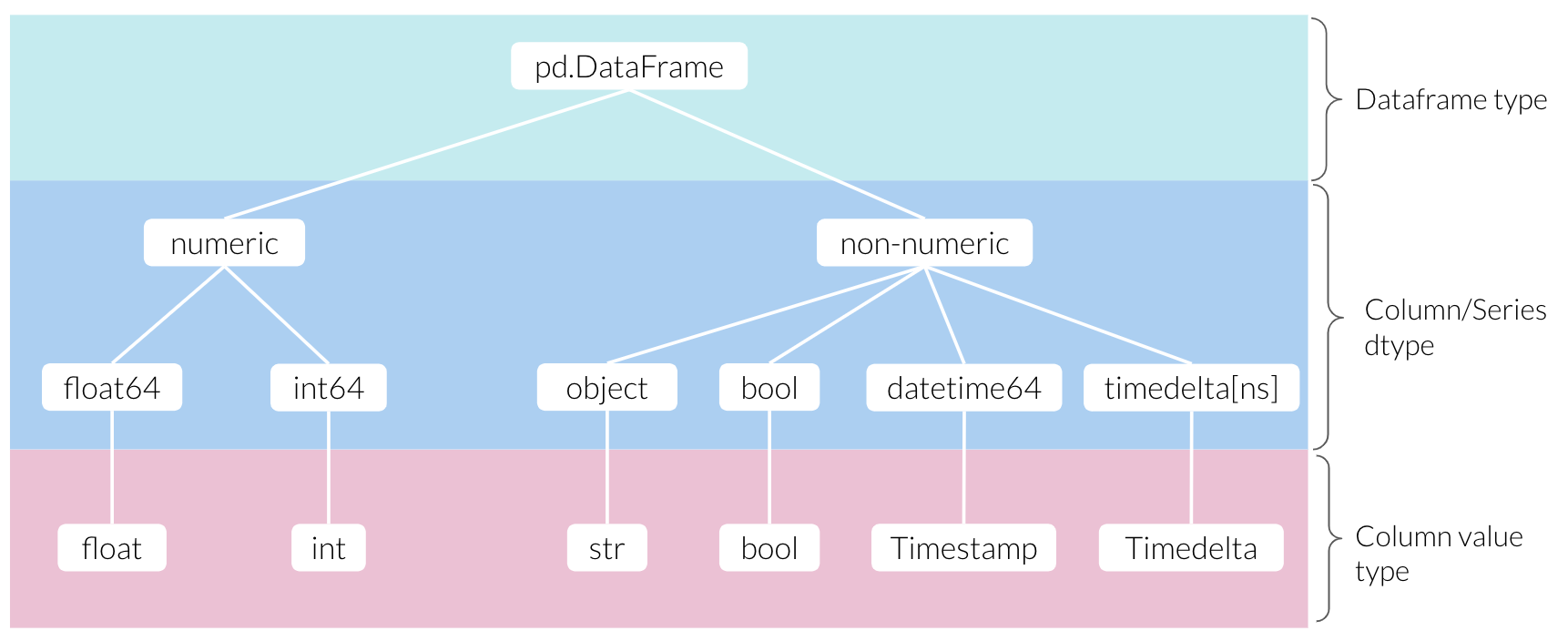
If I select the first example in row 1 of our new_cycling dataset, you’ll notice that it outputs something called a Timestamp.
new_cycling
Timestamp
timestamp_ex = new_cycling.loc[1,'Date']
timestamp_ex
Timestamp('2019-09-11 06:52:00')
timestamp_ex
timestamp_ex.month_name()
'September'
timestamp_ex.day
11
timestamp_ex.hour
6
cycling_intervals = new_cycling['Date'].sort_values().diff()
cycling_intervals
0                NaT
1    0 days 13:39:00
2    0 days 10:31:00
           ...
30   0 days 10:15:00
31   0 days 13:37:00
32   0 days 10:29:00
Name: Date, Length: 33, dtype: timedelta64[ns]
cycling_intervals[1]
Timedelta('0 days 13:39:00')
cycling_intervals[1].seconds
49140
sec_per_hour = 60 * 60
cycling_intervals[1].seconds / sec_per_hour
13.65
cycling_intervals.max()
Timedelta('5 days 13:47:00')
cycling_intervals.min()
Timedelta('0 days 10:15:00')
interval_range = cycling_intervals.max() - cycling_intervals.min()
interval_range
Timedelta('5 days 03:32:00')