2.1. Exercises
Predicting with a Decision Tree
Use the following Decision tree for the next 2 questions:
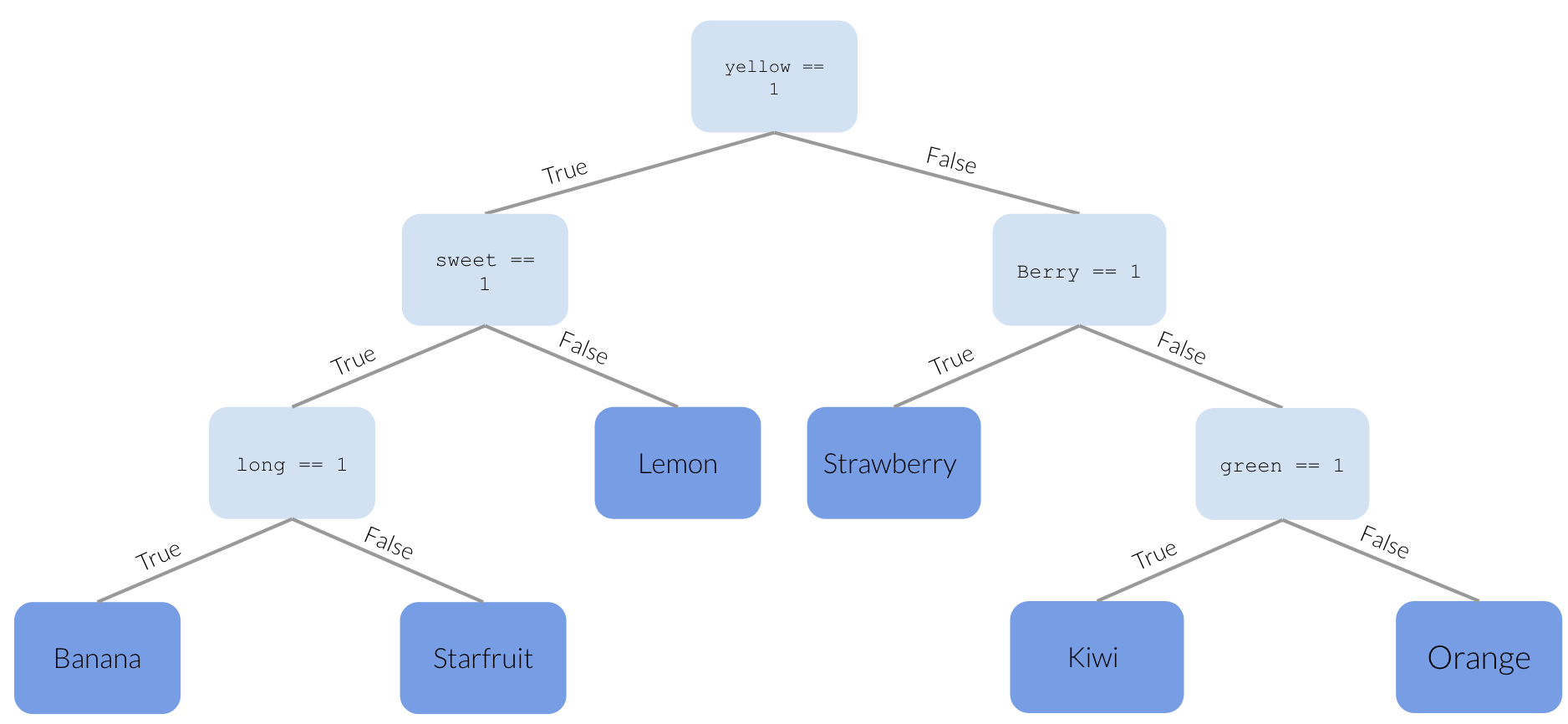
Question 1
Given the features:
    yellow  sweet  berry  long  green  Mexico  seeds
0       0      1      0     0      1       0      1
Question 2
Given the features:
    yellow  sweet  berry  long  green  Mexico  seeds
0       1      0      0     0      0       0      1
Decision Trees True/False
Building a Decision Tree Classifier
Instructions:
Running a coding exercise for the first time could take a bit of time for everything to load. Be patient, it could take a few minutes.
When you see ____ in a coding exercise, replace it with what you assume to be the correct code. Run it and see if you obtain the desired output. Submit your code to validate if you were correct.
Make sure you remove the hash (#) symbol in the coding portions of this question. We have commented them so that the line won’t execute and you can test your code after each step.
Let’s build a decision tree classifier using DecisionTreeClassifier().
Tasks:
- Build a model using
DecisionTreeClassifier()and make sure to set therandom_stateargument to 1. - Save this in an object named
model. - Fit your model on the objects
Xandy. - Predict on
Xand save the values in an object namedpredicted.
Compare actual and predicted values
Compare the availability column to the predicted column and answer the multiple-choice questions below.