5.1. Exercises
Quick Questions on Tradeoff and Golden Rule
Question 1
Training and Testing Questions
Picking your Hyperparameter Part 1
Instructions:
Running a coding exercise for the first time could take a bit of time for everything to load. Be patient, it could take a few minutes.
When you see ____ in a coding exercise, replace it with what you assume to be the correct code. Run it and see if you obtain the desired output. Submit your code to validate if you were correct.
Make sure you remove the hash (#) symbol in the coding portions of this question. We have commented them so that the line won’t execute and you can test your code after each step.
Let’s take a look at the basketball dataset we saw in exercise 16. We will again be using features height, weight and salary and a target column position.. This time , however, let’s cross-validate on different values for max_depth so we can set this hyperparameter and build a final model that best generalizes on our test set.
First let’s see which hyperparameter is the most optimal.
Tasks:
Fill in the code below.
We are first loading in our
bball.csvdataset and assigning our features toXand our targetpositionto an object namedy.Fill in the code so that it split the dataset into
X_train,X_test,y_train,y_test. Make sure to use a 20% test set and arandom_state=33so we can verify you solution.Next, fill in the code so that a
forloop does the following:- iterates over the values 1-20.
- Builds a decision tree classifier with a
max_depthequal to each iteration. - Uses
cross_validateon the model with acv=10andreturn_train_score=True. - Appends the depth value to the
depthlist in the dictionaryresults_dict. - Appends the
test_scoreto themean_cv_scorelist in the dictionary. - Appends the
train_scoreto themean_train_scorelist in the dictionary.
We have given you code that wrangles this dictionary and transforms it into a state ready for plotting.
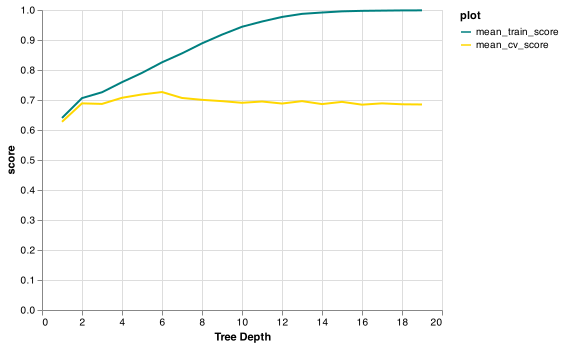
Finish off by filling in the blank to create a line graph that plots the train and validation scores for each depth value. (Note: we have edited the limits of the y-axis so it’s easier to read)
Picking your Hyperparameter Part 2
Now that we have found a suitable value for max_depth let’s build a new model and let this hyperparameter value. How well does your model do on the test data?
Tasks:
- Build a model using
DecisionTreeClassifier()using the optimalmax_depth. - Save this in an object named
model. - Fit your model on the objects
X_trainandy_train. - Evaluate the test score of the model using
.score()onX_testandy_testand save the values in an object namedtest_scorerounded to 4 decimal places.