5.1. Exercises
String Questions
Identify the String Code
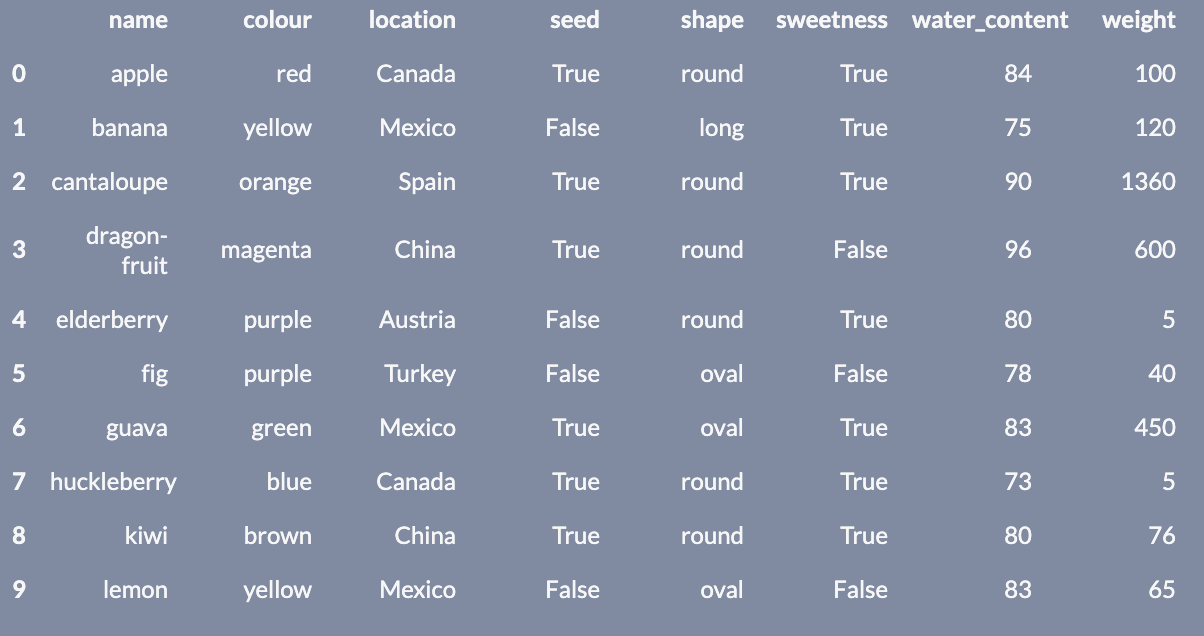
           name   colour location   seed  shape  sweetness  water_content  weight
0         apple      red   canada   True  round       True             84     100
1        banana   yellow   mexico  False   long       True             75     120
2    cantaloupe   orange    spain   True  round       True             90    1360
3  dragon-fruit  magenta    china   True  round      False             96     600
4    elderberry   purple  austria  False  round       True             80       5
5           fig   purple   turkey  False   oval      False             78      40
6         guava    green   mexico   True   oval       True             83     450
7   huckleberry     blue   canada   True  round       True             73       5
8          kiwi    brown    china   True  round       True             80      76
9         lemon   yellow   mexico  False   oval      False             83      65
Practice Handling Strings
Instructions:
Running a coding exercise for the first time could take a bit of time for everything to load. Be patient, it could take a few minutes.
When you see ____ in a coding exercise, replace it with what you assume to be the correct code. Run it and see if you obtain the desired output. Submit your code to validate if you were correct.
Make sure you remove the hash (#) symbol in the coding portions of this question. We have commented them so that the line won’t execute and you can test your code after each step.
Use the output of the following code chunk to help answer the next question.
Let’s transform some of the columns in your canucks dataset. Let’s also see how many of the players have multiple T’s in their name.
Tasks:
- Convert the
PositionandCountrycolumns into uppercase and save this in a dataframe namedcanucks_upper. - Create a new column in the
canucks_upperdataframe namednumber_tswhere you count the total number of times the letter T (lowercase or uppercase) appears in their name. - Save this dataframe named as
canucks_upper_ts. - How many players have multiple T’s in their name?