6.1. Exercises
Advanced String Questions
Strings
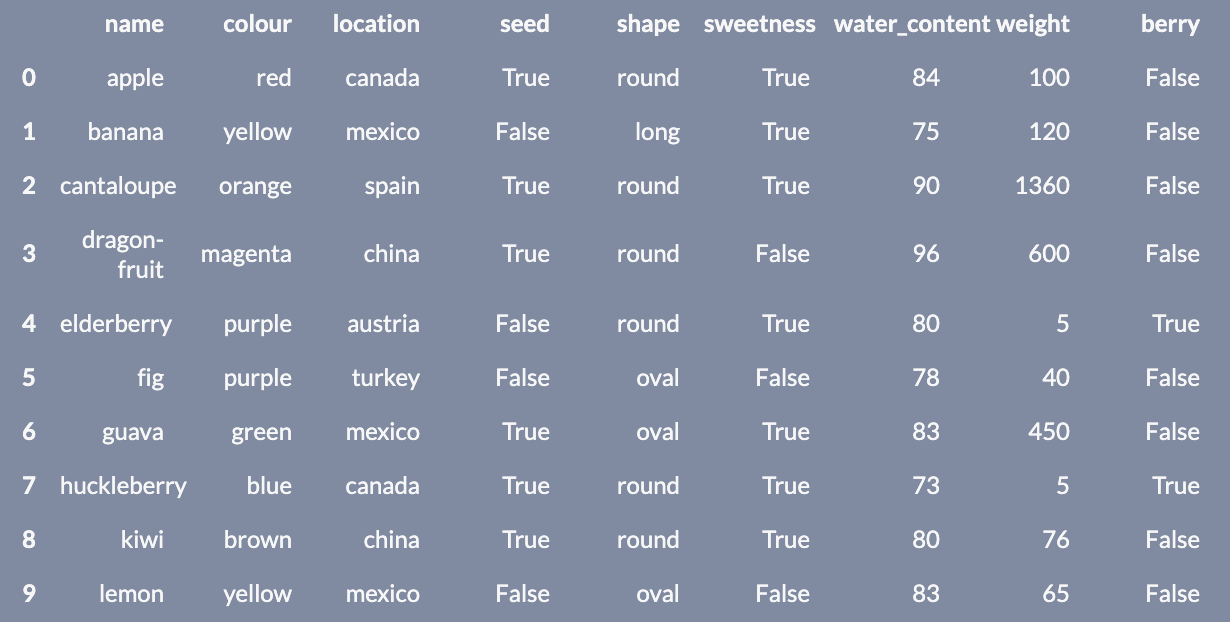
           name   colour location   seed  shape  sweetness  water_content  weight
0         apple      red   canada   True  round       True             84     100
1        banana   yellow   mexico  False   long       True             75     120
2    cantaloupe   orange    spain   True  round       True             90    1360
3  dragon-fruit  magenta    china   True  round      False             96     600
4    elderberry   purple  austria  False  round       True             80       5
5           fig   purple   turkey  False   oval      False             78      40
6         guava    green   mexico   True   oval       True             83     450
7   huckleberry     blue   canada   True  round       True             73       5
8          kiwi    brown    china   True  round       True             80      76
9         lemon   yellow   mexico  False   oval      False             83      65
Processing Strings in a Dataframe
Instructions:
Running a coding exercise for the first time could take a bit of time for everything to load. Be patient, it could take a few minutes.
When you see ____ in a coding exercise, replace it with what you assume to be the correct code. Run it and see if you obtain the desired output. Submit your code to validate if you were correct.
Make sure you remove the hash (#) symbol in the coding portions of this question. We have commented them so that the line won’t execute and you can test your code after each step.
Use the lego dataframe to help answer the next question.
Let’s practice using the verbs we learned from the lesson to process a string column in our Lego dataset.
Tasks:
- Convert the
namecolumn in thelegodataset to lowercase and overwrite the dataframe by saving it as an object namedlego. - Filter the dataset to find all the Lego sets that contain
"weetabix"in thenamecolumn. - Save this as an object named
lego_weetabix. - Replace the word
"weetabix” in thenamecolumn of thelego_wetabixdataframe with the string"cereal-brand". - Save this in an object called
lego_cereal. - If the row contains the word
"promotional"in thenamecolumn, change the entire value to"cereal-brand freebie". - Display
lego_cereal.